Is your API not performing as expected? Are issues piling up, and you have no idea why, because it passed every test your team threw at it? If that sounds familiar, this might be the case for how API performance testing is fundamentally different from pre-launch testing, and why that difference translates directly into your revenue. If you have not picked a load-testing tool yet, start with our decision tree for choosing an API performance testing tool, then come back here once your API passes the load test and still misbehaves in production.
We have been running API audits across fintech platforms, SaaS products, and consumer apps for years, and the same problems appear on almost every engagement. Not because teams are careless, but because these issues are invisible until the moment they are not. Today we’ll share exactly what our experts typically see during performance testing for API.
What API Performance Testing Actually Tells You (That Unit Tests Do Not)
The story usually goes like this: your API checks out through everything you throw at it before going live. Endpoints return the right data, error codes behave as expected, and the QA checklist is spotless. Then you launch, traffic picks up, and something quietly breaks. Usually, this includes response times creeping up, third-party integrations timing out, and users on your mobile app watching a spinner that never stops. By the time your team isolates the issue, the damage is already done. Now, you’ve got unhappy customers, a missed SLA, or a failed payment that someone screenshots and posts online.
This is the gap that dedicated API performance testing exists to close. Not the checkbox kind, but the kind that simulates what your API actually faces in the real world: hundreds of concurrent users, unpredictable bursts of traffic, vendor services that hiccup at the worst possible moment. According to Cloudflare’s research on web performance and conversions, a two-second delay in response time leads to roughly a 4% loss in revenue per visitor. For a business doing $5 million a year online, that is a $200,000 problem hiding inside what looks like a perfectly functioning product.
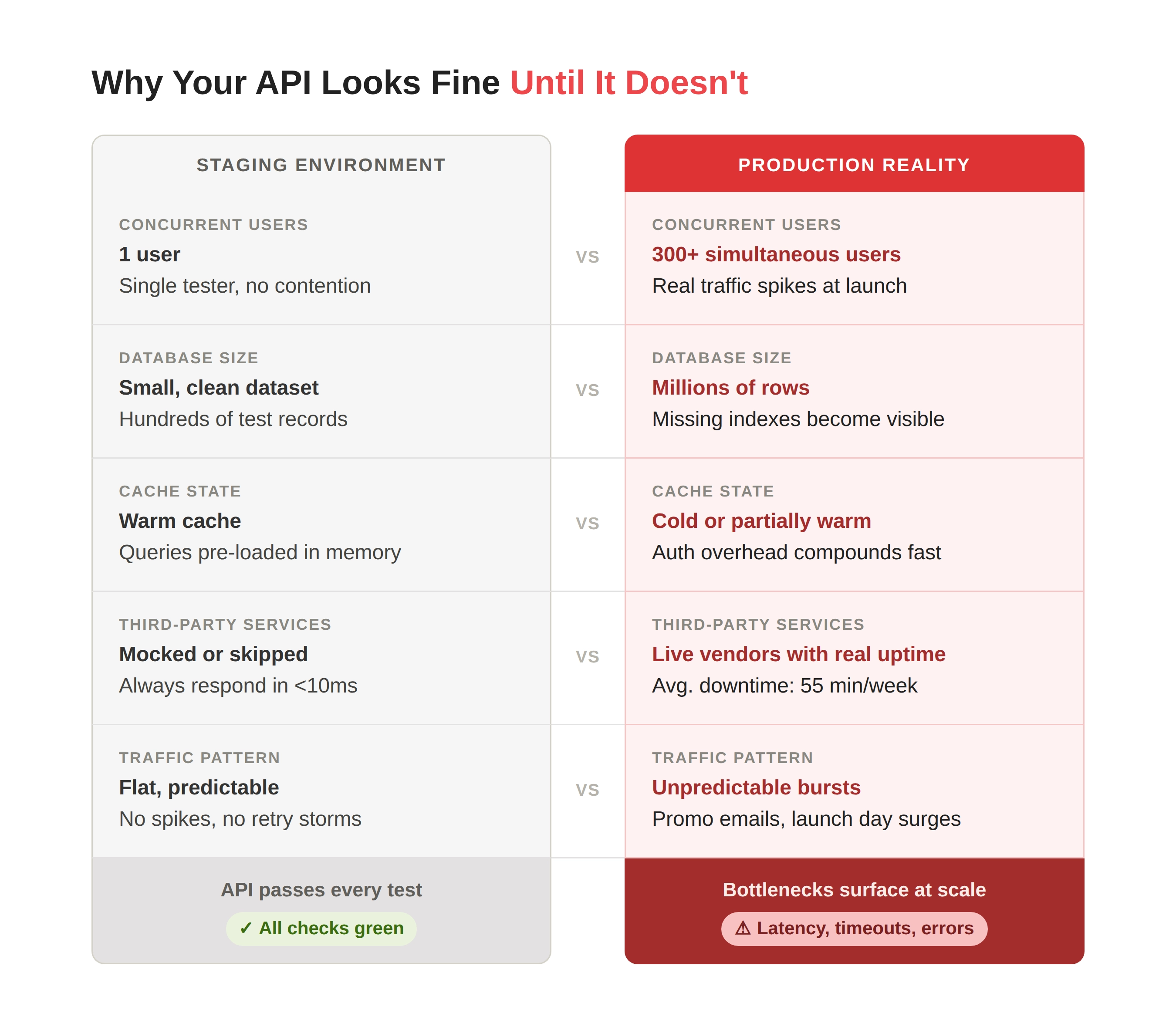
Unit tests confirm that a single function does what it is supposed to do in isolation. They are useful, but they tell you almost nothing about how your API behaves when 300 users hit it simultaneously, when your database is already under load from a background job, or when a third-party dependency decides to respond in 8 seconds instead of 80 milliseconds.
Performance testing for APIs recreates the conditions that matter: realistic concurrent user counts, production-representative data volumes, and the kinds of traffic spikes that occur on launch day or during a promotional campaign. It is the only method that reveals what your system looks like at the exact moment your business most needs it. If that sounds like something worth knowing before your users find out, read on.
7 Bottlenecks We See in Every API Performance Testing Audit
The bottlenecks below are not hypothetical edge cases pulled from a textbook. They are the findings that repeatedly show up in our audit reports across industries, tech stacks, and team sizes. Some will feel familiar, but if more than two of them sound like something that could exist in your product right now, that is a sign you should start addressing them before they become someone else’s screenshot.
Bottleneck 1: Unoptimized Database Query Patterns Under Load
Each API endpoint usually looks completely fine when you test it on its own. Send a request, get a response in 50 milliseconds, move on. The problem arises when 200 users do the same thing at the same time, and the database quietly runs a separate query for each item in the list instead of fetching everything in one go.
This is called the N+1 query problem, and it is one of the most common findings in web API performance testing audits. An endpoint that returns a list of 50 orders might trigger 51 database queries per request, 50 individual lookups plus one for the list itself. Multiply that by concurrent users, and you have turned a fast API into a slow one without a single line of bad code being obvious in isolation.
Missing database indexes compound the problem further. Without them, every query scans entire tables instead of jumping straight to the relevant rows. Under load, this translates directly into latency spikes and timeouts that functional testing will never surface, because functional tests do not run the query under meaningful concurrent pressure.
The fix is not complicated once you know the problem exists. It just requires API load testing under realistic conditions to expose it.
Bottleneck 2: Connection Pool Exhaustion
Your API connects to a database through a pool of pre-established connections rather than opening a new one for each request. That pool has a size limit, and when all available connections are in use, new requests wait. Under API load testing with realistic concurrent users, this ceiling gets hit surprisingly quickly.
Most teams configure connection pools based on average expected load. The trouble is that the average load doesn’t break systems, it’s traffic spikes that do. A promotional email goes out, a product gets featured somewhere, a payment processor slows down and holds connections open longer than usual, and suddenly your pool is exhausted. New requests queue, queue times exceed timeouts, and users see errors.
This is also where the relationship between performance and architecture becomes visible. A pool sized for 100 average concurrent users will fail under 300, even if your servers have plenty of CPU and memory headroom. Knowing the actual ceiling before your users discover it is precisely what pre-release pressure testing is designed to reveal.
Bottleneck 3: Third-Party Dependency Timeouts With No Fallback
Modern APIs rarely operate in isolation. Payment gateways, fraud detection services, geolocation APIs, email delivery platforms: your product probably calls several of them on every meaningful user action. When one of those external services slows down or goes offline, what does your API do?
If the answer is ‘wait indefinitely’ or ‘return a 500 error’, you have this bottleneck. And according to Uptrends’ 2025 State of API Reliability report, average API uptime across industries fell to 99.46% in Q1 2025, up from 99.66% the year prior, meaning the risk of third-party slowdowns is rising, not falling.
An API that has no timeout settings on outbound calls and no circuit breaker logic to gracefully degrade when a vendor service is struggling will pass every functional test you run. It will only reveal itself as a problem when your checkout flow hangs because a geolocation API in another region is responding slowly. Performance API testing with injected latency on third-party calls is the only reliable way to see how your system actually behaves when the vendors it depends on do not cooperate.
Bottleneck 4: Inefficient Payload Sizes (Over-Fetching and Under-Fetching)
Your API returns 40 fields per object, but your mobile app displays only six. The other 34 are fetched, serialized, transmitted across the network, and then silently ignored by the client. Now multiply that by every API call your app makes per session, and by every concurrent user.
Over-fetching is an extremely common finding in web API performance testing audits, particularly in older REST codebases where endpoints were designed for one use case and then reused across many others. The bandwidth cost is real, the serialization overhead adds latency, and on mobile networks where every byte matters, the effect on user experience is tangible.
Under-fetching is the inverse problem. A client needs data from five objects to render a single screen, so it makes five separate API calls in sequence, making five round trips instead of one. In a mobile context on a flaky connection, that compounds into visible load times even when each individual call is fast.
When we were working with Union54, Africa’s first card-issuing API, one of the bugs our team caught involved an endpoint returning stale or incorrect data in its response object, even though the database held the correct values. The card balance and status in the API response did not match those stored in the database after the card’s state changed. In a fintech context, that kind of data mismatch between what the API sends and what the system actually holds is exactly the category of issue that performance and integration testing under realistic load is designed to surface. Union54 went on to raise $15 million in seed funding, with the product cleared of critical issues before its investor demo day.
Bottleneck 5: Authentication and Token Validation Overhead on Every Request
Your API is secured with tokens, which is exactly right. The question is what happens on every single authenticated request. If your API calls an external identity service or hits the database to verify a session on every request without any caching, you have introduced latency that compounds with scale.
Authentication overhead is often invisible in development because the validation is fast when your identity service is warm, and your user table is small. However, realistic API load testing usually shows that with a cold cache and a user table with millions of rows, the same validation that took 5 milliseconds in staging takes 120 milliseconds in production. Multiply that by every API call in every user session, and the effect on perceived performance is significant.
Caching token validation results for a short, appropriate window eliminates most of this overhead. But the fix requires knowing the problem exists, which means running performance testing for APIs under authentic concurrent load rather than in a single-user staging environment.
Bottleneck 6: Missing or Misconfigured Rate Limiting and Throttling
An API without rate limiting is an open invitation for things to go wrong, not just from malicious actors, but from your own systems. When a service experiences an error and retries the same request in a loop, or when a client integration malfunctions and fires thousands of requests in seconds, an unprotected API absorbs the full impact.
The OWASP API Security Top 10 lists Unrestricted Resource Consumption as entry number four on the list of critical API security risks, specifically because missing rate limiting and throttling controls are both a performance issue and a security exposure. An API that can be overwhelmed by an accidental retry storm from a legitimate integration is equally vulnerable to a deliberate denial-of-service attempt.
Rate limiting is not only about setting a requests-per-minute threshold at the gateway level. It also means throttling at the user, IP, and endpoint level, setting sensible timeouts, and ensuring that your API fails gracefully rather than cascading. Our security testing and performance testing work often uncover this gap together, which is why the two disciplines are more closely related than most teams assume. If you want to go deeper on how API-level vulnerabilities get exploited in practice, our web penetration testing checklist covers the overlap between performance weaknesses and security exposure in detail.
Bottleneck 7: No Performance Baselines or Defined SLA Thresholds
This one is the most invisible of all, because there is nothing broken to point to. Your API is working, response times look reasonable, and nobody has complained yet.
However, ‘reasonable’ and ‘acceptable’ are not the same thing unless you have defined what acceptable actually means. Without documented performance baselines and SLA (Service Level Agreement) thresholds, your team has no way to know whether last week’s deployment made your API 30% slower. There is no benchmark to compare against, no alert that fires when P95 latency crosses a meaningful threshold, and no definition of what ‘good’ looks like that can be encoded into a CI/CD pipeline check.
This is how performance regressions accumulate silently over months of development. Each release adds a little latency, while no single deployment looks alarming. Six months later, an API that used to respond in 80 milliseconds now takes 400. According to Postman’s State of the API Report, between 26 and 50 APIs now power the average enterprise application. In that environment, a performance regression in one API propagates through dependent services in ways that make the root cause extremely hard to trace after the fact. The software testing phases article on our blog covers exactly why catching these issues early in the development cycle costs a fraction of what it takes to investigate them in production.
Why These Bottlenecks Stay Hidden Until It Is Too Late
Every one of the issues above shares a common characteristic: they are undetectable by testing that does not replicate production conditions. A single-user test environment with a small, clean database, warm caches, and no third-party latency injected will pass an API that fails badly under real-world load. The gap between your staging and production environments is where these bottlenecks live, quietly waiting for the moment your business actually depends on the API to perform.
The time to find them is before that moment arrives.
If two or three of the bottlenecks above sounded familiar, that is not bad luck. It is a pattern we see across teams of all sizes and experience levels, because these issues only reveal themselves under conditions that most teams do not routinely create. The good news is that finding them is straightforward once you are testing in the right way, with realistic load, production-representative data, and someone who knows what to look for.
That is what our API performance audits are built to do. We have done this for fintech APIs handling real-money transactions, for SaaS platforms serving enterprise clients with strict uptime SLAs, and for consumer apps where response time is the difference between a retained user and an uninstalled one. Whenever you are ready to see what your API looks like under pressure, give us a call.
See how our testing helped an AI digital growth tool boost regression testing speed by 50%.